
LiveOne: Stream Music & More
Slacker Inc.Music & Audio
4.5111.03K Reviews
- Version
- Varies With Device
- Installs
- 100.00M
- Age Rating
- Teen
Screenshots
Our Review of LiveOne: Stream Music & More
 Analysis by Appyee
I tend to judge a listening app by what happens after the first few minutes: can I settle into something quickly, and does it still suit the moment when my plans change? LiveOne: Stream Music & More is built around having music, podcasts, and radio in one place, so it makes the most sense for people who like to move between those formats rather than open a separate app for each one. I found that the convenience is real, though it doesn’t automatically make every listening choice easier.
A routine that makes the mix useful
My simplest way to use LiveOne is to choose a listening lane before I start: music when I want a steady background, a podcast when I can focus on speech, or radio when I’d rather let a station guide the mood. That small decision helps avoid aimless browsing. If I’m cooking, for example, I can start with a radio station and keep moving instead of pausing to build a queue. If I’m settling in for a longer session, exploring playlists gives me more room to steer what comes next.
That combination is the app’s practical appeal. A single service can cover different parts of a day, but I wouldn’t expect its recommendations to read my mind. When a suggestion lands, it can be a pleasant route into music I might not have searched for; when it misses, switching to a station or choosing a different playlist is a more reliable reset than repeatedly tapping through similar recommendations.
Settings and small choices worth checking
LiveOne is a free music and audio app from Slacker Inc., with optional in-app purchases. Its average rating is 4.5 from around 355,000 ratings, and it has been installed over 100 million times. Those figures suggest broad interest, but they don’t tell me whether its mix suits an individual listener. The useful test is whether its combination of music, podcasts, and radio matches what you actually reach for.
I’d check the listening and account options early, rather than waiting until I’m already out the door. The app’s paid offering is described as ad-free and includes offline listening, which can matter if interruptions bother you or you need audio away from Wi-Fi. Since purchases are optional and listed at different price points, I’d look at the current in-app choices and decide based on how often I would use those benefits. For occasional listening, starting free is the sensible way to see whether the app earns a regular place on your phone.
One useful habit is to notice which format works best in each setting. A playlist may be easier when I want to shape the mood; radio is handy when I want less choosing; a podcast suits a stretch when I can give spoken audio my attention. Treating these as different tools makes the breadth feel practical instead of making the home screen another menu to browse.
Faster ways to settle into listening
When I find a playlist or station that fits a repeatable moment, I make a mental note of it rather than restarting my search from scratch the next time. A familiar starting point is especially useful for routines such as getting ready, cooking, or unwinding after work. I can still branch out when I’m in the mood, but I don’t have to turn every listening session into a discovery project.
I also try not to judge recommendations after only one or two choices. Music suggestions are most helpful when I give the app a clear direction and then pay attention to whether the next few picks feel right. If they drift, changing the source—say, moving from a playlist to a radio station—can be a cleaner correction than hoping the same stream will suddenly become a better fit. This is a small workflow adjustment, but it saves time and makes exploration feel less random.
Where the all-in-one approach has limits
LiveOne’s range is its strength, but it also means listeners should be clear about what they value most. If I mainly want a particular podcast listening routine, a dedicated podcast app may be a better fit. If precise control over a carefully arranged music queue is my priority, I’d compare the available listening experience with a service designed around that habit before committing. LiveOne is most compelling when I want variety and convenience, not when I expect one format to have every specialized tool.
Offline listening and an ad-free experience are tied to the paid offering, so the free option may not suit someone who needs uninterrupted audio or wants to prepare listening for places without a connection. I’d also consider how much I actually switch between music, podcasts, and radio: if I only use one of those, the all-in-one advantage matters less. The app is rated for teens, so families should take that age guidance into account when deciding who should use it.
Who I’d recommend it to
I’d suggest giving LiveOne a try if you like sampling music, putting on radio while doing something else, and having podcasts available without treating each as a separate destination. A realistic day might begin with a playlist while getting ready, shift to a radio station during dinner prep, and end with a podcast when chores are done. The point isn’t that every listener needs all three; it’s that the app can accommodate those changes without making the phone feel like a stack of unrelated audio tools.
I’d be less likely to recommend it to someone who already has a music service they love and wants only a specialist podcast tool, or to anyone who needs offline playback without paying for an upgrade. Before buying, I’d check the purchase options in the app and weigh them against actual listening habits rather than paying for features that sound useful in theory. That keeps the decision grounded in how often the benefits will matter.
Finding a comfortable way to use LiveOne
First off, downloading the app was a breeze. Whether you’re rocking an Android or iOS device, LiveOne is available on both platforms and it’s completely free to download. Once you’ve got it installed, the sign-up process is pretty straightforward. You can connect using your email or link it with your social media accounts, which is super convenient.
Interface and Usability
One of the first things that caught my eye was the clean and intuitive interface. No clutter, just all your music needs laid out in an easy-to-navigate menu. Seriously, it feels like the app knows what you want before you even do. Everything from the personalized playlists to the trending tracks is just a tap away. And if you’re like me and enjoy a bit of customization, you can tweak the settings to suit your listening style.
Music and More
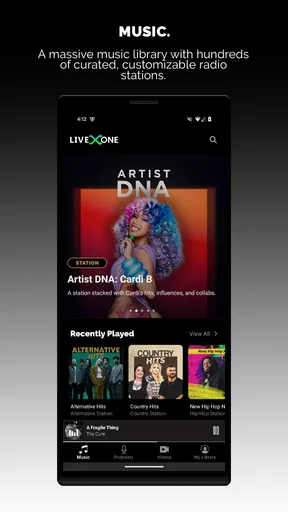
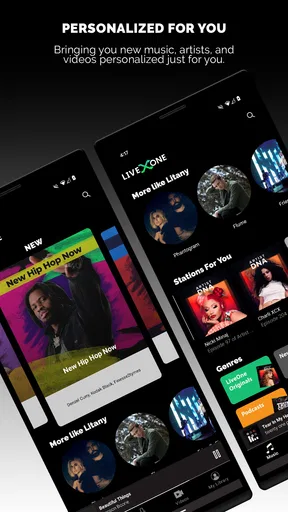
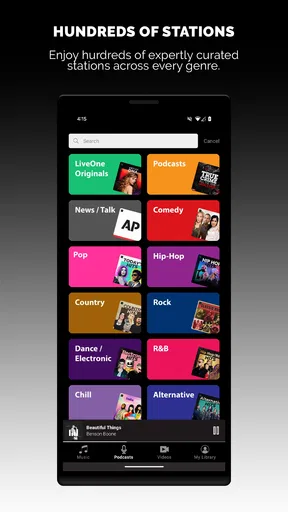
Now, let’s dive into what truly matters—the music! LiveOne offers a vast library of tracks across all genres. Whether you’re into pop, rock, classical, or something a bit more niche, you’re covered. I spent hours just exploring different playlists, and the app’s recommendation engine is spot on. It keeps suggesting tracks that I end up loving, which is a win for me.
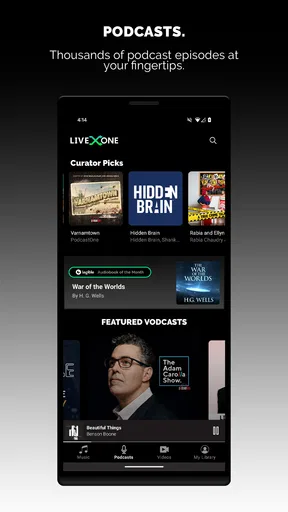
But that’s not all. The app also boasts a selection of podcasts and live radio stations. Whether you’re into crime thrillers or need a daily news update, there’s something for everyone. I found myself tuning into live radio while cooking dinner, and it just added a little extra fun to my evening routine.
Exclusive Content and Features
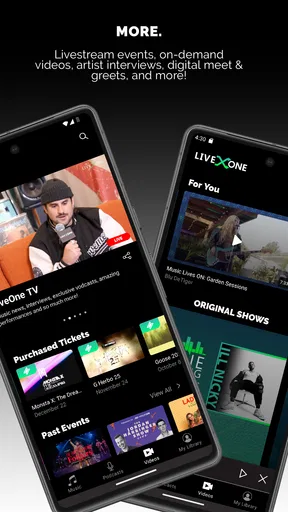
One of the standout features is the exclusive content. LiveOne hosts live performances from various artists, and trust me, it’s like having a concert in your pocket. Plus, the app often features interviews and behind-the-scenes content that you won’t find anywhere else. It’s these little perks that make the app feel like it was made for true music enthusiasts.
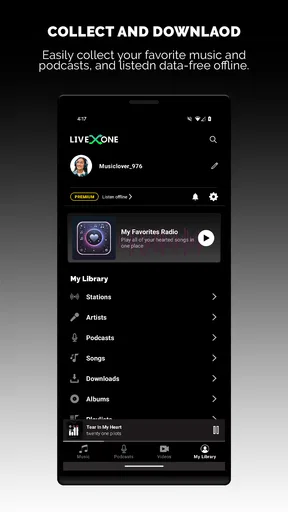
And if you’re worried about ads interrupting your jam sessions, there’s a premium version available. It’s ad-free and offers offline listening, which is perfect for those moments when you’re out of Wi-Fi range but still need your music fix.
Community and Interaction
Music is often a social experience, and LiveOne gets that. The app includes features that let you connect with friends, share playlists, and even see what your buddies are listening to. It’s a cool way to discover new music and stay connected with your music-loving pals.
Final Thoughts
So, is LiveOne: Stream Music & More worth your time? Absolutely! It’s a versatile app that caters to all your music and podcast needs with ease. Whether you’re looking to discover new tunes, listen to your favorite podcast, or enjoy exclusive live content, this app has got you covered. Plus, the community features add a nice touch for those who enjoy sharing their music journey with others.
All in all, if you’re a music aficionado like me, you’ll want to give LiveOne a spin. It’s not just another music app; it’s a gateway to a world of sound. Go ahead, download it, and let the music take you away!
For me, the best way to decide is to give the free experience a fair trial across more than one kind of session. Try a playlist when you want to choose the mood, radio when you want fewer decisions, and a podcast when you can listen closely. That reveals whether the variety is something you’ll use, rather than just a long list of options that looks appealing on installation day.
My overall view is that LiveOne works best as a flexible audio companion, not necessarily as the perfect specialist for every listener. Its mix is convenient when your day shifts between music and spoken audio, and the optional paid features address two clear needs: fewer ad interruptions and offline listening. If those needs are occasional, stay with the free version; if they shape your routine, compare the current purchase choices with how often you’ll rely on them. The strongest reason to keep it is having several listening moods close at hand, while the clearest reason to skip it is wanting one format with more dedicated control.
Verdict
Strengths of LiveOne: Stream Music & More
- Extensive music library available.
- High-quality audio streaming.
- Customizable playlists feature.
- User-friendly interface design.
- Offline listening available.
Limitations of LiveOne: Stream Music & More
- Ads in the free version.
- Limited skips for free users.
- Requires account signup.
- Some features are premium-only.
- Occasional app crashes.
Similar Picks in This Category
View All
YouTube Music
Google LLC4.4

Samsung Music
Samsung Electronics Co., Ltd.3.8

Spotify: Music and Podcasts
Spotify AB4.3

JioSaavn - Music & Podcasts
Saavn Media Limited4.3

Lark Player:Music Player & MP3
Lark Player Studio - Music, MP3 & Video Player4.6

StarMaker: Sing Karaoke Songs
SKYWORK AI PTE. LTD.4.3
You May Also Like
View All

Frequently Asked Questions
What is LiveOne and what does it offer?
LiveOne is a streaming app that provides a wide range of music and live events. It features curated playlists, personalized radio stations, and exclusive live performances. Users can enjoy a diverse selection of genres and discover new artists. The app also offers podcasts and video content to enhance the overall entertainment experience.
Is LiveOne free to use, or does it require a subscription?
LiveOne offers a free version with ads and limited features, as well as a premium subscription called LiveOne Plus. The Plus version removes ads, provides unlimited skips, and offers offline listening. Users can choose between monthly or annual subscriptions, making it flexible to fit different budgets and preferences.
What devices support the LiveOne app?
LiveOne is available on both Android and iOS devices, ensuring compatibility with a wide range of smartphones and tablets. Additionally, it can be accessed on web browsers, smart TVs, and some gaming consoles, offering versatile options for users to enjoy their music and content across multiple platforms.
Can I listen to LiveOne content offline?
Yes, LiveOne Plus subscribers can download music and playlists for offline listening. This feature is particularly useful for users on the go or those with limited data plans. Offline listening allows you to enjoy your favorite tracks without an internet connection, providing uninterrupted access to your curated library.
How does LiveOne personalize my listening experience?
LiveOne uses advanced algorithms to analyze your listening habits and preferences, curating playlists and radio stations tailored to your tastes. The app also offers recommendations based on your favorite genres and artists. This personalized approach ensures that users discover new music and content that aligns with their interests.
